





Options Strategy Builder
Visualise your potential profit & loss before you place a trade
Multiple Pre-built strategies
Pay-off graph & OI analysis
Hedge benefit
One click execution
Let’s Get Started


Visualise your potential profit & loss before you place a trade
Let’s Get Started

Pre-built strategies across indices & stocks for every risk appetite

Validate the strategies with pay off to see how they may perform

Seamlessly execute all the legs of the strategy in single click
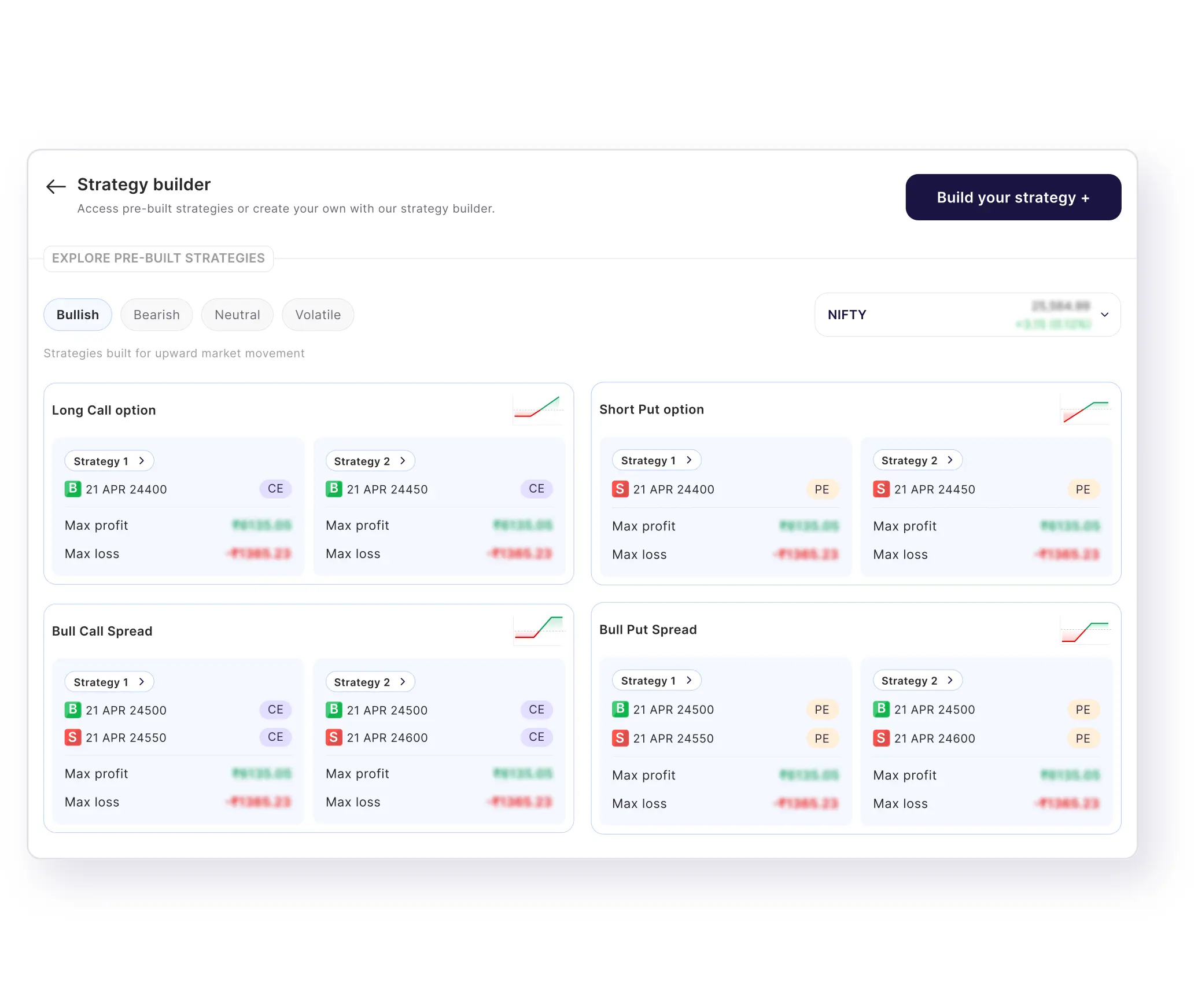

Easy to build multi-leg strategies with multiple permutation & combination

Analyse your strategy with pay-off graph and OI data

Know your risk and potential gain before entering any trade

Turn complex strategies into simple, actionable trades
Is video mein hum jaanenge Strategy Builder ke baare mein. Strategy Builder ek aisa tool hai jo aapko F&O trading ki strategy plan karne mein madad karta hai.
Yeh Options Chain ke data se strategy build karta hai. Payoff graph ke through analyze karta hai aur sirf ek hi click mein aapki strategy execute karta hai.
Strategy Builder aapke do kaam aasan kar deta hai — sahi strategy ki research aur risk ko balance karna.
Maan lijiye agar aap bullish view select karte ho, yaani aapko lagta hai ki market upar jayega, to Strategy Builder aapke capital aur risk appetite ko samajhkar multiple bullish strategies dikhata hai.
Har selected strategy ke saare legs, maximum profit aur maximum loss clearly visible hote hain, taaki aap usi basis par strategy ko select, analyze aur execute kar sako.
Aap Nifty, Bank Nifty, Sensex jaise indices mein se bhi apni strategy select kar sakte ho.
Aur agar aapko khud ki strategy banani ho, to Build Your Own Strategy tab ke through apni custom strategy create kar sakte ho.
Yahaan aap easily navigate karke legs add kar sakte ho, maximum profit-loss analyze kar sakte ho, aur jab ready ho tab one click par apni strategy execute kar sakte ho.
Par agar apni banayi hui strategy ko study karna chahte ho, to Preview section mein jaakar payoff graph aur risk-reward ko detail mein dekh sakte ho, taaki aap ek informed decision le sako.
Ventura Strategy Builder is an advanced options trading tool designed to help traders create, analyse, and execute F&O strategies with ease. Whether you’re a beginner exploring options trading or an experienced trader building complex strategies, the tool simplifies the entire process in one place.
With Ventura Strategy Builder, you can build multi-leg options strategies using calls and puts across different strike prices and expiries. It allows you to visualize your trades through real-time payoff graphs, helping you clearly understand potential profit, loss, and breakeven levels before placing an order.
One of the key benefits of using the strategy builder is its ability to provide data-driven insights. You can view important metrics like risk-reward ratio, option Greeks, and margin requirements, enabling more informed decision-making. Instead of manually calculating outcomes, the tool does the heavy lifting for you.
The platform also supports pre-built strategy templates, allowing you to quickly get started with popular strategies like straddles, strangles, and iron condors. You can customise these strategies based on your market outlook and risk appetite.
Once your strategy is ready, Ventura Strategy Builder lets you execute all legs in a single click, ensuring a seamless transition from planning to trading.
To create an options strategy, you combine different option contracts (calls and puts) based on your market view—whether you expect the market to go up, down, or stay range-bound. You choose strike prices, expiry, and position size, and structure them to balance risk and reward. Using a strategy builder makes this process easier by helping you visualize outcomes before you trade.
Yes, a custom strategy builder is safe to use as long as you understand the strategy you’re creating. It’s a tool that helps you analyse trades better—it doesn’t execute anything without your action. Always review the payoff, risk, and margin before placing a trade.
An F&O strategy builder helps you plan trades more effectively by showing potential profits, losses, and breakeven points in advance. It saves time, reduces manual errors, and allows you to test different strategies so you can make more informed trading decisions.
The main risk is relying on the tool without fully understanding the strategy. Market conditions can change, and actual results may differ from projections. To manage this, always double-check your strategy, use proper position sizing, and avoid taking excessive risk based only on projected outcomes.
To use the custom strategy builder, select your underlying (like Nifty or a stock), choose your desired options (calls/puts), and add multiple legs to create your strategy. The tool will automatically show payoff graphs, risk-reward, and margin required. Once satisfied, you can execute the strategy in a single click.
Yes, the strategy builder shows margin required for each strategy whether it is pre-built or custom built. If the strategy legs are in specific combination which creates hedge benefit as per regulation, the hedge benefit is extended and applied to the required margin.



For android only